
Complete Guide to Session Widget (Global Market Hours)
Iran Widget's Session Widget is a professional tool for displaying live global financial market status on your website. In this 5-part guide, you will fully learn about the features, installation process, advanced settings, and benefits of this essential widget.
Part One: Introducing Session Widget and Its Necessity
In the complex and dynamic world of financial markets, access to real-time and accurate information about the opening and closing times of global markets is not just an advantage but a necessity. The Session Widget (Market Session Widget), developed by the specialized team at Iran Widget, is a precise and practical response to this need.
This advanced widget enables you to display the live status of the world's most important financial markets directly on your website or platform. From the Tehran Stock Exchange and Asian markets to the financial hubs of Europe and America.
Having a Session Widget on financial, investment, and analytical websites not only increases efficiency but also significantly enhances the site's professional credibility, demonstrating the site administrators' attention to users' precise needs.
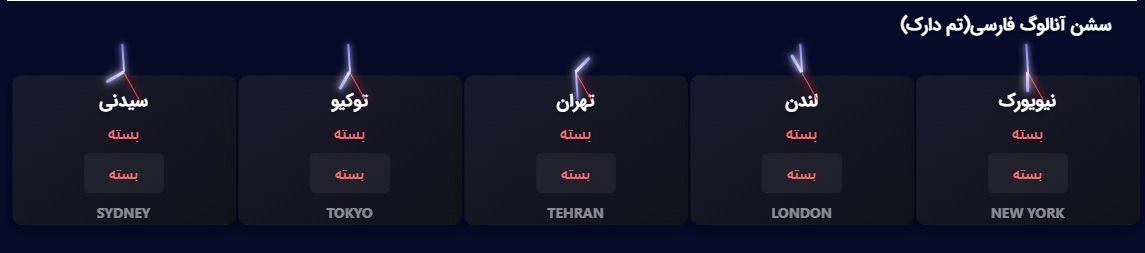
Image 1: Overview of Iran Widget's Session Widget displaying the status of various global markets
Part Two: Technical Features and Unique Capabilities
Iran Widget's Session Widget utilizes the latest web technologies to offer a complete set of features:
- Complete Market Coverage: Displays 5 major global markets (Sydney, Tokyo, Tehran, London, New York) in local time and Tehran time.
- Two Display Modes: Analog (classic) and digital (modern) design to match any taste and site style.
- Fully Automatic Updates: No need for manual updates; widget data and logic are updated in real-time from the server.
- Smart Status Display: Clearly shows the "Open", "Closed", or "About to Open/Close" status of each market.
- Countdown Timer: Minute-by-minute and second-by-second countdown to the next market opening or closing.
- Full Compatibility: Flawless performance on all modern browsers (Chrome, Firefox, Safari, Edge).
Image 2: Comparison of analog (left) and digital (right) display modes of the Session Widget
Global Market Schedule Table (in Tehran Time)
| Market Name | City/Country | Opening Time | Closing Time | Usual Status |
|---|---|---|---|---|
| Sydney | Australia | 00:30 | 09:30 | First active market |
| Tokyo | Japan | 03:30 | 12:30 | Powerful Asian market |
| Tehran | Iran | 10:30 | 19:30 | Domestic market |
| London | UK | 11:30 | 19:30 | European financial hub |
| New York | USA | 15:30 | 00:30 | World's largest market |
Part Three: Step-by-Step Installation Guide
Installing the Session Widget is so simple that even without programming knowledge, you can activate it in less than 2 minutes. The general process is done in three steps:
1. Copy the widget code from the Session Widget page
2. Place the code in the desired location on your site
3. Save and view the live widget
Method 1: Installation on WordPress (Simplest Method)
For WordPress users, the Session Widget can be used via Shortcode:
[iranwidget_session type="analog" theme="light" language="en"]You can place this code in any section of your site that supports shortcodes, such as the Gutenberg editor, Elementor, or even in a text widget.
Method 2: Installation on HTML and Non-WordPress Sites
For static sites or other content management systems, use the following HTML code:
<!-- Iran Widget Session Widget Code -->
<div class="iranwidget-session"
     data-type="digital"
     data-theme="dark"
     data-lang="en">
</div>
<script src="https://cdn.iranwidget.com/session-widget.js"></script>
Simply place these two lines of code within the <body> section of your HTML page, at the desired location for displaying the widget.

Image 3: How to place the Session Widget shortcode in the WordPress Gutenberg editor
For proper widget functionality on non-WordPress sites, make sure the script code (session-widget.js) loads only once on the page. Duplicate placement may cause conflicts.
Part Four: Advanced Settings and Customization
You can customize the Session Widget according to your site's color scheme and specific needs. Adjustable parameters:
Main Shortcode Parameters
[iranwidget_session
    type="digital"
    theme="light"
    language="en"
    size="medium"
    markets="all"
]
Practical Examples
Display only Asian markets with dark theme:
[iranwidget_session type="digital" theme="dark" markets="sydney,tokyo,tehran"]Display large analog widget in English:
[iranwidget_session type="analog" size="large" language="en"]Minimal display for site footer:
[iranwidget_session type="digital" size="small" theme="light"]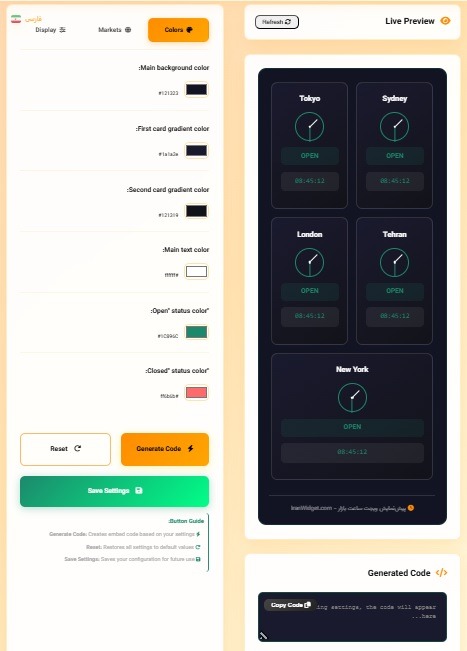
Image 4: Live preview of changes when selecting different parameters in the Iran Widget panel
For developers, further styling via CSS is also possible. All widget components have specific classes. For example, to change the color of active market text:
.iranwidget-session .market-active {
    color: #FF4500 !important;
}
Part Five: Frequently Asked Questions and Summary
No. The widget code is optimized and loads asynchronously (Async). Its size is very minimal (under 50KB) and has no noticeable impact on page load time.
With a professional license purchase, a unique license code is issued for you. Simply add this code to your widget parameters: [iranwidget_session ... license="YOUR_LICENSE_KEY"]. The watermark will be removed immediately.
Yes. The Session Widget supports multiple languages including English, Persian, and Arabic. Just set the language="en" parameter.
The Iran Widget support team is available via WhatsApp, ticket, and email for free assistance. Complete video tutorials are also available on the Blog.
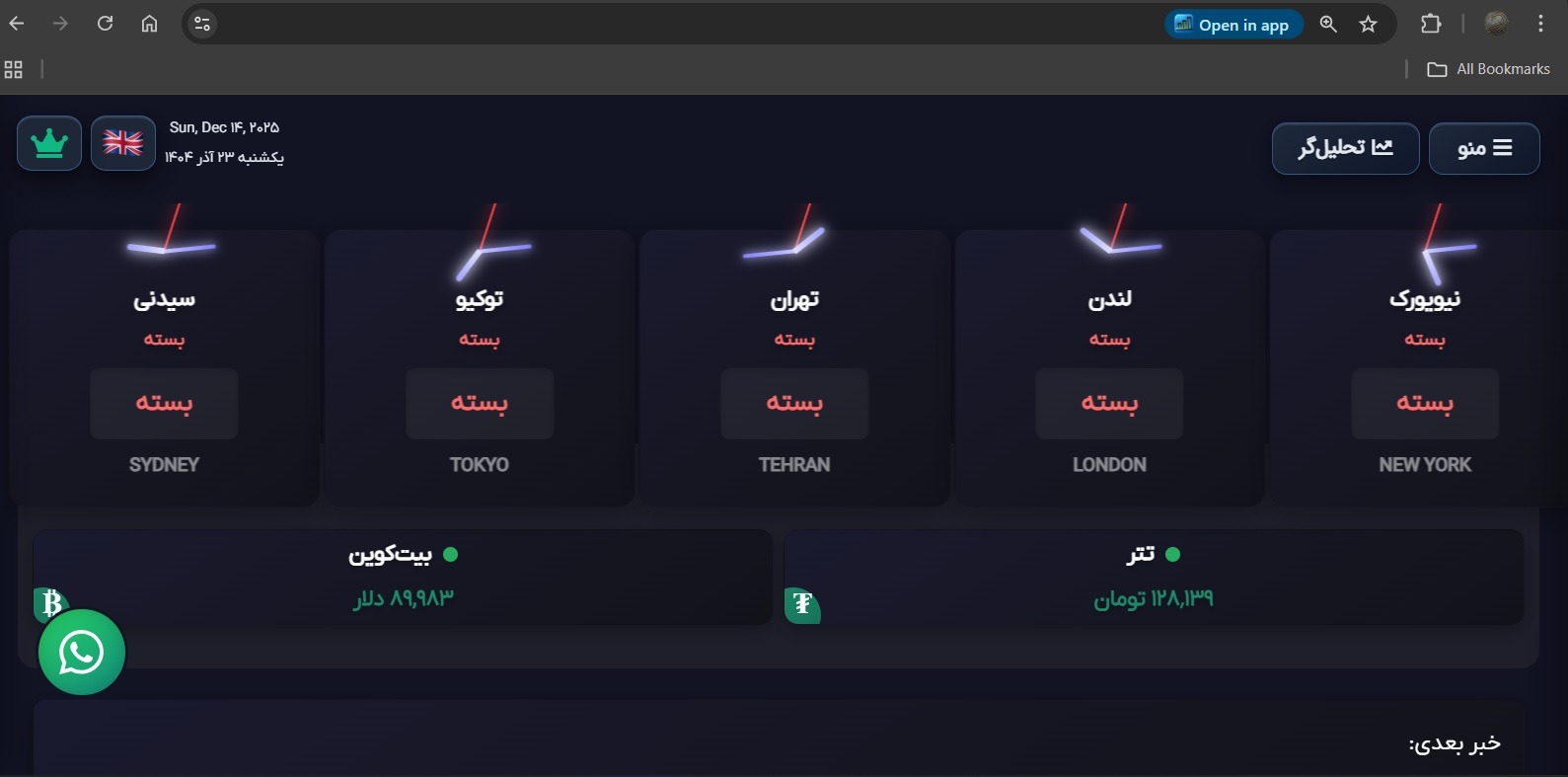
Image 5: The Session Widget is active live on an analytical financial website.
Part Six: Practical Applications and SEO Benefits of Session Widget
Using the Session Widget goes beyond a simple display. This tool can strengthen your site's content strategy and SEO.
Practical Applications on Different Types of Sites:
- Financial and Stock Analysis Sites: Traders and analysts constantly need to check trading sessions. Having this widget on the homepage or analytical articles increases users' Dwell Time.
- Forex and Cryptocurrency Educational Platforms: Students can view relevant market hours while learning concepts, which increases Engagement.
- Economic News Sites: Pairing news with live market status enhances news credibility and increases the chance of receiving backlinks from other sources.
- Investment Advisors and Funds: Professional display of this widget on the website serves as visual proof of comprehensive thinking and attention to detail for gaining client trust.
Direct Benefits for SEO:
- Reduced Bounce Rate: The widget's dynamic and useful content keeps users on the page, turning it into an interactive destination.
- Increased Dwell Time: As mentioned, displaying useful and up-to-date information encourages curious users to stay and explore other parts of the site.
- Creation of Unique Content: The status displayed by the widget is unique at every moment. This dynamism can be recognized by search engines and considered a positive factor.
- Improved User Experience (UX): Providing essential information without requiring users to leave the page creates a smooth and professional experience, which is an important Google ranking factor.
A page containing the Session Widget naturally includes important keywords such as "forex market hours", "London market opening time", "current global market status", and more. These semantically related keywords help Google correctly understand the page's topic and rank it for more related searches.
Part Seven: Comparison of Iran Widget Session Widget with Other Solutions
To display market hours, you might use other methods like plain text, static images, or foreign widgets. This comparison table shows why the Session Widget is a better choice.
| Feature / Method | Iran Widget Session Widget | Static Text on Page | Static Image | Free Foreign Widgets |
|---|---|---|---|---|
| Accuracy & Updates | ✅ Real-time & Automatic | ❌ Manual & Error-prone | ❌ Completely Static | ⚠️ Often Delayed |
| Impact on Site Speed | ✅ Optimized & Lightweight | ✅ No Impact | ⚠️ Depends on Image Size | ❌ Often Heavy & Multiple Requests |
| Appearance Customization | ✅ Complete (Theme, Size, Language) | ✅ Limited (Font & Color) | ❌ Needs Redesign | ⚠️ Very Limited |
| SEO Support | ✅ Excellent (Dynamic Content, Better UX) | ⚠️ Average | ❌ Poor (Text in Image Not Readable) | ⚠️ Unclear (May Cause Technical Issues) |
| Maintenance Cost | ✅ One-time Purchase (Pro Plan) | ⚠️ Time Cost for Updates | ⚠️ Design Cost for Changes | ✅ Free (But with Serious Limitations) |
| Support & Guidance | ✅ Persian Support Team | ❌ None | ❌ None | ❌ Weak or No Support |
As you can see, the Iran Widget Session Widget is the only option that simultaneously offers high accuracy, suitable speed, customization capability, and professional support. Using temporary or unprofessional solutions can damage your site's credibility in the long run.
Part Eight: Future Vision and Integration with Iran Widget Ecosystem
The Session Widget is powerful on its own, but its true power is revealed alongside other Iran Widget products. By combining these widgets, you can create a professional and fully integrated financial dashboard on your site.
Creating a Financial Dashboard by Combining Widgets:
Imagine on one page of your site, users could simultaneously:
- See market hours and status with the Session Widget.
- Check upcoming economic events in the Forex Calendar Widget.
- Receive latest market-moving news from the News Widget.
- Monitor real-time currency and cryptocurrency price fluctuations in the Crypto Price Widget.
Such a page will not only be an unparalleled resource for your users but will also become a hub for targeted traffic attraction and a page with a high Conversion Rate.
Development for Developers (API):
If you are a developer or have a technical team, you can use Iran Widget's powerful API for deeper integration of data into your custom application or management panel:
- Receive raw session data via Forex Calendar API.
- Receive price data streams via Crypto Price API.
This approach enables the creation of completely custom and complex user experiences.
Sites that today use multiple specialized and integrated widgets are registered in users' minds as comprehensive and reliable references. This Brand Authority over time not only increases user loyalty but also sends the strongest positive signal for the SEO of the entire site. Investing in such tools is a smart long-term move.
Ready to Look More Professional?
Iran Widget's Session Widget is more than a display tool; it's a professional value addition for your site that increases user trust and their time on site.
Professional Plan Features (1,200,000 Tomans): Lifetime license, watermark removal, permanent technical support, lifetime free updates.
View Demo & Buy Session WidgetTo read more educational articles, be sure to visit the Iran Widget Blog. For more information or free consultation, you can also contact our team through Contact Us.


Complete Guide to Iran Widget Forex Factory Calendar API
Complete Guide to Iran Widget Forex Factory Calendar API (Secure, Bilingual, Lifetime License) Iran Widget Forex Factory Calendar API — Secure, stable, and easy access to 200+ economic news from
Complete Guide to Iran Widget Cryptocurrency Price API (Secure, Stable, Lifetime License)
Complete Guide to Iran Widget Cryptocurrency Price API (Secure, Stable, Lifetime License) Iran Widget Cryptocurrency Price API — Secure, stable, and simple access to real-time prices of 50+ cryptocurrencies (IRT/USDT)

The Complete Guide to Live Crypto Price Widget
The Complete Guide to Live Crypto Price Widget (3 Themes, Lifetime License) IranWidget Live Crypto Price Widget – Real-time cryptocurrency price display with 3 different themes (Price List, Single Card,